---
title: Home
image: https://turbo-chart.com/hubfs/Imported_Blog_Media/Featured%20Image.png
---
[Skip to content](https://turbo-chart.com#main-content)
[](https://www.turbo-chart.com?hsLang=en)
- [Home](https://turbo-chart.com)
- [Product](https://turbo-chart.com/product-presentation)
Show submenu for Product
- [Changelog](https://turbo-chart.com/changelog)
- [Presentation & Demonstration](https://turbo-chart.com/product-presentation)
- [Turbo-Chart or Tilos?](https://turbo-chart.com/turbo-chart-vs-tilos)
- [Features](https://turbo-chart.com/features)
- [Chart Samples](https://turbo-chart.com/sample-interactive-viewer-charts)
- [Purchase](https://turbo-chart.com/purchase)
- [Help](https://learn.turbo-chart.com)
Show submenu for Help
- [F.A.Q.](https://turbo-chart.com/faq)
- [Knowledgebase](https://learn.turbo-chart.com)
- [Licence Portal](https://portal.turbo-chart.com/)
- [Time Location Mini-Course](https://turbo-chart.com/time-location-charting-mini-course)
- [Contact Us](https://turbo-chart.com/contact-us)
- [About](https://turbo-chart.com/about)
Show submenu for About
- [Customers](https://turbo-chart.com/turbo-chart-customers)
- [About Us](https://turbo-chart.com/about)
- [News](https://turbo-chart.com/blogs)
- [Contact Us](https://turbo-chart.com/contact-us)
- [Terms](https://turbo-chart.com/terms)
Open main navigation
Close main navigation
- [Home](https://turbo-chart.com)
- [Product](https://turbo-chart.com/product-presentation)
Show submenu for Product
- [Changelog](https://turbo-chart.com/changelog)
- [Presentation & Demonstration](https://turbo-chart.com/product-presentation)
- [Turbo-Chart or Tilos?](https://turbo-chart.com/turbo-chart-vs-tilos)
- [Features](https://turbo-chart.com/features)
- [Chart Samples](https://turbo-chart.com/sample-interactive-viewer-charts)
- [Purchase](https://turbo-chart.com/purchase)
- [Help](https://learn.turbo-chart.com)
Show submenu for Help
- [F.A.Q.](https://turbo-chart.com/faq)
- [Knowledgebase](https://learn.turbo-chart.com)
- [Licence Portal](https://portal.turbo-chart.com/)
- [Time Location Mini-Course](https://turbo-chart.com/time-location-charting-mini-course)
- [Contact Us](https://turbo-chart.com/contact-us)
- [About](https://turbo-chart.com/about)
Show submenu for About
- [Customers](https://turbo-chart.com/turbo-chart-customers)
- [About Us](https://turbo-chart.com/about)
- [News](https://turbo-chart.com/blogs)
- [Contact Us](https://turbo-chart.com/contact-us)
- [Terms](https://turbo-chart.com/terms)
- [Download Page](https://turbo-chart.com/download)
[Download Page](https://turbo-chart.com/download?hsLang=en)
# Turbo-Chart
**WHAT IS**
## Turbo-Chart?
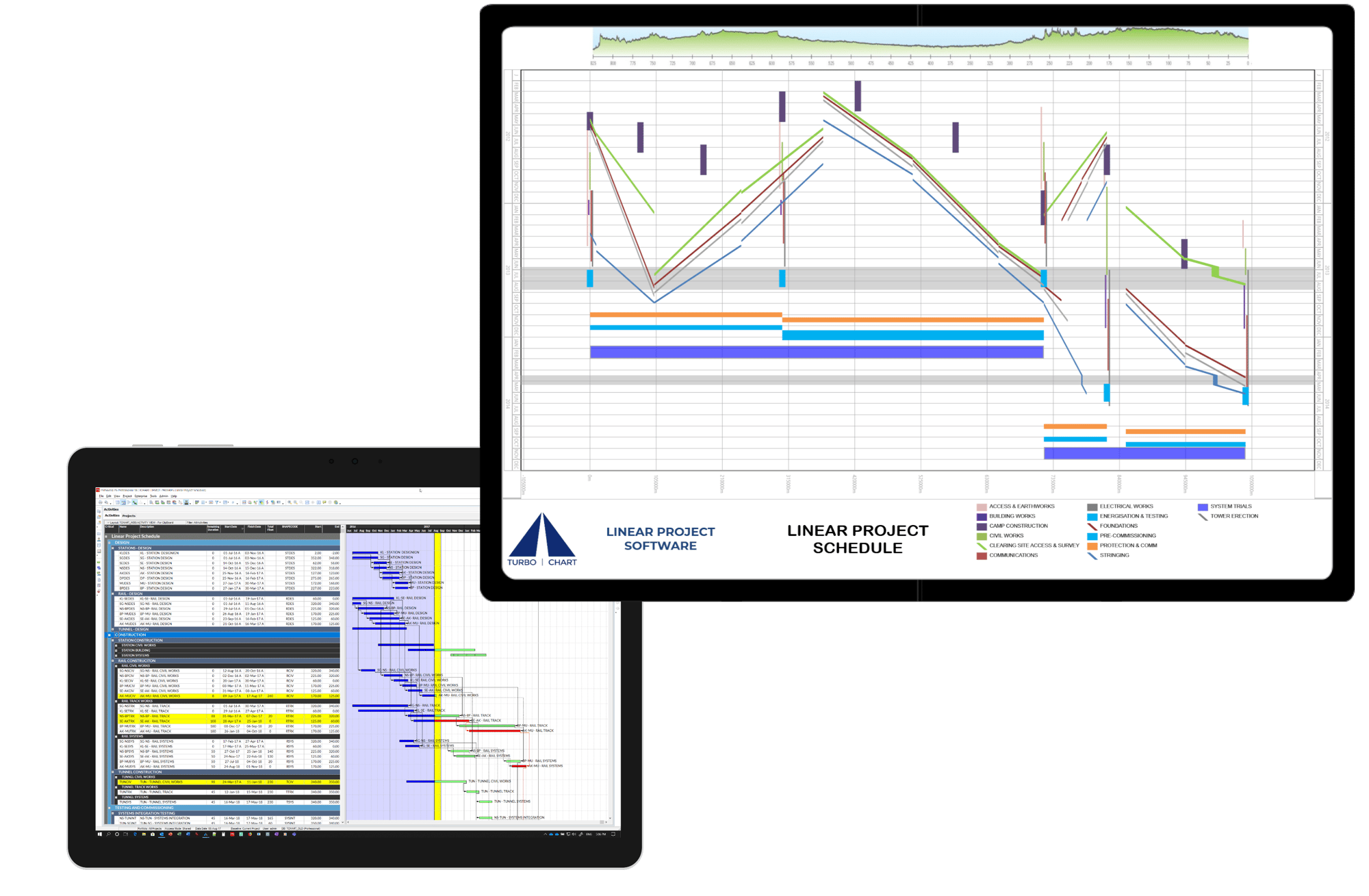
Turbo-Chart is a desktop application, to effortlessly generate Time-Location charts in minutes utilizing your current project schedule data.
Unlike alternatives like Tilos or Excel generated charts, Turbo-Chart integrates with your preferred scheduling tools such as:
- Primavera P6: Standalone, Professional, EPPM & Cloud
- Oracle Primavera Cloud (OPC)
- MS Project,
- Asta PowerProject,
- Safran, and
- More, using our easy Copy and Paste Wizard
[Download to start your 14-Day free trial!](https://turbo-chart.com/download?hsLang=en)
## Interested in our Enterprise Licensing options for Turbo-Chart across your organisation
Book a call with our team now to discuss options to best suit your requirements
[Book a Call](https://turbo-chart.com/contact-us?hsLang=en)
**What are**
## Time Location Charts
Time Location Charts are an alternative form of representing project schedules suited to linear projects where work progresses in a repetitive manner and/or in a continuous linear-direction over the project’s physical location and also where works occur in fixed locations that interface with the linear works. Examples of linear projects include:
- Highways
- Railway
- Tunnels, and
- High-Rise Building Construction
Visit our FREE Time Location Charts Mini-Course
[Mini-Course](https://turbo-chart.com/time-location-charting-mini-course?hsLang=en)
[](https://turbo-chart.com/time-location-charting-mini-course?hsLang=en)
**WHO IS**
## Using Turbo-Chart?
You no longer need complex expensive software, or error-prone manual drawing methods
Turbo-Chart enhances your existing scheduling capabilities, rather than compete against them, saving you valuable time, cost and effort, that can be spent improving your schedules!




















**WHAT ARE**
## Turbo-Chart users saying?
Hear customer testimonials on the benefits of using Turbo-Chart
**Turbo-Chart**
## Features and Benefits

#### Integration
We make integration easy! Your existing scheduling tool (P6, MSP etc) remain the single source of truth.

#### Data Re-sync
#### When you make changes to your schedule (in P6 , MSP etc), re-sync to instantly see the changes on your chart.

#### Multiple Charts
Additional charts allow you show more than one view of the same data. E.g. you may show a summary of the overall road project and more detailed charts of bridges/intersections.

#### Multiple Datasets
DataSets allow you to easily compare scenarios on the same chart. E.g. Compare Planned vs Actual, or baseline vs P80 Risk Adjusted.

#### Chart Orientation
Some charts work better laid out differently. E.g. Multi-story building are best with height on the Y axis, and time on the X, but linear projects like railways, tunnels and bridges are usually best with location as the X axis an time on the Y axis. Turbo-Chart lets you choose the orientation and direction of each axis.

#### Shape Library
#### Choose between Line, Area, Parallelogram and Triangle basic shapes. Customise colours, fill styles and colours and opacity to create an unlimited number of shapes types. The legend is created automatically but is fully customisable. Filter Shapes displayed per chart.

#### Annotations
Annotations are additional text and graphics placed anywhere on your chart. Even though we can help you generate a chart from schedule data in seconds, the best charts have additional information on them to keep everyone informed.

#### Highlighters
As well as text and graphics, we can help you quickly highlight key dates and locations on your chart. Our highlighters can help readers see locations like bridges, stations or levels, or dates like contract milestones, weather periods or the data-date.
## Latest Turbo-Chart News
[](https://turbo-chart.com/blogs/changes-to-turbo-chart-in-2026?hsLang=en)
[News](https://turbo-chart.com/blogs/tag/news?hsLang=en)
### [Changes to Turbo-Chart in 2026](https://turbo-chart.com/blogs/changes-to-turbo-chart-in-2026?hsLang=en)
[Read more](https://turbo-chart.com/blogs/changes-to-turbo-chart-in-2026?hsLang=en)
[](https://turbo-chart.com/blogs/turbo-chart-update-2.3.0.3?hsLang=en)
[Updates](https://turbo-chart.com/blogs/tag/updates?hsLang=en)
### [Turbo-Chart Update 2.3.0.3 and 2.3.0.4](https://turbo-chart.com/blogs/turbo-chart-update-2.3.0.3?hsLang=en)
[Read more](https://turbo-chart.com/blogs/turbo-chart-update-2.3.0.3?hsLang=en)
[](https://turbo-chart.com/blogs/turbo-chart-at-aace-conex_2024?hsLang=en)
[Events](https://turbo-chart.com/blogs/tag/events?hsLang=en)
### [Turbo-Chart at 2024 AACE ConEX](https://turbo-chart.com/blogs/turbo-chart-at-aace-conex_2024?hsLang=en)
[Read more](https://turbo-chart.com/blogs/turbo-chart-at-aace-conex_2024?hsLang=en)
[View All News](https://turbo-chart.com/blogs?hsLang=en)
### Want to find out more about Turbo-Chart:
#### Book a call with us to:
- Discuss how Turbo-Chart will help your project
- Watch a demonstration of Turbo-Chart
- Get help understanding how to use Turbo-Chart
#### Additional Help
[View F.A.Qs](https://turbo-chart.com/faq?hsLang=en)
Knowledge Base
#### External Links
[linkedin-in icon](https://www.linkedin.com/company/turbo-chart/) [Follow us on Facebook](https://www.youtube.com/channel/UCy_w21liyxPpX6_d1tGV9fg)


[linkedin-in icon](https://www.linkedin.com/company/turbo-chart) [youtube icon](https://www.youtube.com/channel/UCy_w21liyxPpX6_d1tGV9fg)
- [Home](https://turbo-chart.com)
- [Terms](https://turbo-chart.com/terms)
[Contact Us](https://turbo-chart.com/contact-us?hsLang=en)
Copyright © 2026, Turbo-Chart
```json
{
"@context" : "https://schema.org",
"@type" : "VideoObject",
"contentUrl" : "https://22261683.fs1.hubspotusercontent-na1.net/hubfs/22261683/T-Chart_130520.mp4",
"dateModified" : "2023-09-21T05:00:24.308Z",
"description" : "Turbo-Chart is a new tool for creating Time Location charts, also known as Linear Schedules or Time chainage diagrams. Turbo-Chart takes an elegant approach to visualizing linear project schedules, transforming your existing data into Time-Location charts in minutes.\n\nTurbo-Chart works with your chosen scheduling tool. Your time location chart updates instantly as your schedule changes, so there’s no need to duplicate your work. \n\nAllowing you to focus on planning and scheduling your project, rather than generating charts.",
"duration" : "PT1M20S",
"height" : 1080,
"name" : "Turbo-Chart Explainer Video",
"thumbnailUrl" : "https://22261683.fs1.hubspotusercontent-na1.net/hubfs/22261683/T-Chart_130520.mp4/medium.jpg",
"uploadDate" : "2023-09-21T04:59:45.506Z",
"width" : 1920
}
```
```json
{
"@context" : "https://schema.org",
"@type" : "VideoObject",
"contentUrl" : "https://stream.mux.com/CiHOpQDx1jPWimC7DVhPywuijK00udYXt5HnaF7a9wl00/capped-1080p.mp4",
"dateModified" : "2025-02-25T14:13:56.630Z",
"duration" : "PT26S",
"height" : 1080,
"name" : "Who is using Turbo-Chart",
"thumbnailUrl" : "https://22261683.fs1.hubspotusercontent-na1.net/hubfs/22261683/Who%20is%20using%20Turbo-Chart.mp4/medium.jpg",
"uploadDate" : "2025-02-25T14:13:56.624Z",
"width" : 1920
}
```
```json
{
"@context" : "https://schema.org",
"@type" : "VideoObject",
"contentUrl" : "https://22261683.fs1.hubspotusercontent-na1.net/hubfs/22261683/Life%20Since%20TC%20Draft%201.1.mp4",
"dateModified" : "2023-09-21T07:11:36.036Z",
"description" : "Our customers share the benefits of using Turbo-Chart in their planning and scheduling of projects.",
"duration" : "PT2M10.48S",
"height" : 1080,
"name" : "Customer Stories - Benefits of Using Turbo-Chart",
"thumbnailUrl" : "https://22261683.fs1.hubspotusercontent-na1.net/hubfs/22261683/Life%20Since%20TC%20Draft%201.1.mp4/medium.jpg",
"uploadDate" : "2023-09-21T06:42:15.134Z",
"width" : 1920
}
```